What a lot of acronyms. We want to automate converting colour spaces in a web app. It’s not easy.
A month or so ago, we were putting the finishing touches to a site that sells upmarket nail lacquer.
Lacquer is all about colour, so we wanted to give shoppers a way to quickly and visually browse all the available colours with colour swatches, rather than the more traditional product shot route. This makes particular sense because all lacquer bottles look pretty much the same, photos of them give a poor impression of the actual colour, and they take up way more screen estate than is helpful to anyone.
Getting hold of standardised colour information for the products was nigh on impossible. After a week or so of tracking and calls to the US, Japan, UK and back the only information we were able to collect was rough CMYK data used to print colour approximations. We needed to translate all these colours into RGB, to display on-screen.
The trouble with CMYK
If you know about CMYK, you’ll understand what a problem this is.
In standard 4-colour printing, four plates are created, one for each of Cyan, Magenta, Yellow and Key (which is black). Each plate is printed to the paper in turn, leaving dots of colour on the page. When viewed up close, you can see these quite clearly. When viewed from a normal reading distance, the colour dots mix like paint to form the myriad other colours you can see.
The trouble with CMYK is it’s pretty rough. The technique is only capable reproducing some 60 or 70% of 16.7 million colours visible to the human eye, and which we can display on a computer screen. The RGB model can represent every one of these colours, and therefore every colour that CMYK can represent; but the converse is not true. The diagram below shows some of CMYK’s closest approximations to some bright screen colours.
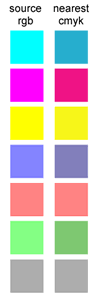
By starting with an inaccurate source, our RGB colours would never be particularly accurate, which can be a real problem on a website selling a colour-oriented product – particularly where many of the colours, such as red lacquers, are quite similar in the first place.
Converting CMYK to RGB – pass 1
Nevertheless, this is what we had to work with, so we decided to press on and convert the colours. Rather than spending an age dropper-ing and converting in Photoshop, I decided to write a quick PHP function to handle the job.
Well. I assumed I could write a quick PHP function to do the job.
A little internet research – and I apologise, I don’t remember my sources here – turned up a couple of techniques that looked promising. Here’s one, translated into PHP:
/**
* @param int $c
* @param int $m
* @param int $y
* @param int $k
* @return object
*/
function cmyk_to_rgb($c, $m, $y, $k)
{
    $r = 255 - round(2.55 * ($c+$k)) ;
    $g = 255 - round(2.55 * ($m+$k)) ;
    $b = 255 - round(2.55 * ($y+$k)) ;

    if($r<0) $r = 0 ;
    if($g<0) $g = 0 ;
    if($b<0) $b = 0 ;

    $o->r = $r ;
    $o->g = $g ;
    $o->b = $b ;

    return $o ;
}
Taking four integers as arguments, this function returns an object with the properties r, g, b, which can be fairly easily converted into hex for web use.
So, how does it work? 255 is the maximum value for any of R, G or B. When all three are set to 255, the colour produced is white, because RGB is an additive colour model. When all three are at 0, the colour is black.
By contrast, CMYK is a subtractive colour model, and the maximum for each value is 100, meaning 100%. The percentage here is – I think – of ink coverage: 50% Cyan means the dots of cyan ink cover 50% of that area, leaving the rest clear. Please correct me if I am wrong on this.
In RGB, you mix up a pure cyan using 100% blue and 100% green – or 0,255,255. Similarly, a pure magenta is red and blue – 255,0,255 – and a pure yellow is red and green – 255,0,255.
If we assume that this cyan, magenta and yellow are the same as the cyan, magenta and yellow of CMYK; and the amount of this cyan, magenta and yellow is inversely proportional to the K value in CMYK (because RGB is additive) – all we need is a little arithmetic to carry out the transformations, which is what’s happening above. (Although not being a mathematician, I’m stuck on explaining it).
Pass 1 results
Sounds cool. Here is the result, comparing some original CMYK swatches to the results generated by this function, along with Adobe Illustrator’s conversions for comparison.
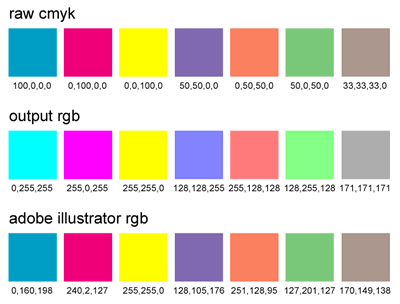
For some purposes, this result is just fine. But not for nail lacquer – the colours are just way too bright. Yet you can see the maths and logic in the colour codes, if you compare the raw CMYK to the function output. Conversely, the colour codes in Illustrator’s conversions make little sense, but the colours are just right.
CMYK to RGB – pass 2: Voisen.org
Like many of these things, we started to run out of time. We just had to get this issue solved, and press on with other areas of the site. We were already unhappy to be starting with a CMYK source. We were doubly unhappy not to have an easy to convert this data. We decided to go back to square one and dropper the colours in PhotoShop. We launched the website, and now it’s doing great, and we have a very happy client.
But not a very happy me. Time for some more internet research at https://www.google.co.uk/search?hl=en&q=cmyk+to+rgb+function
Voisen.org has an ActionScript method that is similar to the above, but has a slightly different treatment of the K value. Promising. Here is it, verbatim:
// voisen.org
Color.prototype.2rgb = function( c, m, y, k )
{
    // Convert percentages to 0 – 255 range
    c = (0xFF * c) / 100;
    m = (0xFF * m) / 100;
    y = (0xFF * y) / 100;
    k = (0xFF * k) / 100;

    r = this.dec2hex( Math.round( ((0xFF – c) * (0xFF – k)) / 0xFF ) );
    g = this.dec2hex( Math.round( (0xFF – m) * (0xFF – k) / 0xFF ) );
    b = this.dec2hex( Math.round( (0xFF – y) * (0xFF – k) / 0xFF ) );
    return “0x”+r+g+b;
}
Remembering that 0xFF = 255, and we don’t need the decimal to hex conversions, let’s convert the maths to PHP:
function cmyk_to_rgb2($c, $m, $y, $k)
{
    $c = (255 * $c) / 100;
    $m = (255 * $m) / 100;
    $y = (255 * $y) / 100;
    $k = (255 * $k) / 100;

    $r = round(((255 - $c) * (255 - $k)) / 255) ;
    $g = round((255 - $m) * (255 - $k) / 255) ;
    $b = round((255 - $y) * (255 - $k) / 255) ;

    $o->r = $r ;
    $o->g = $g ;
    $o->b = $b ;

    return $o ;
}
A quick test shows that this function returns the exact same results as pass 1 for the colours tested above, which is what we’d expect, because they all have 0K. But what about other CMYK mixes?
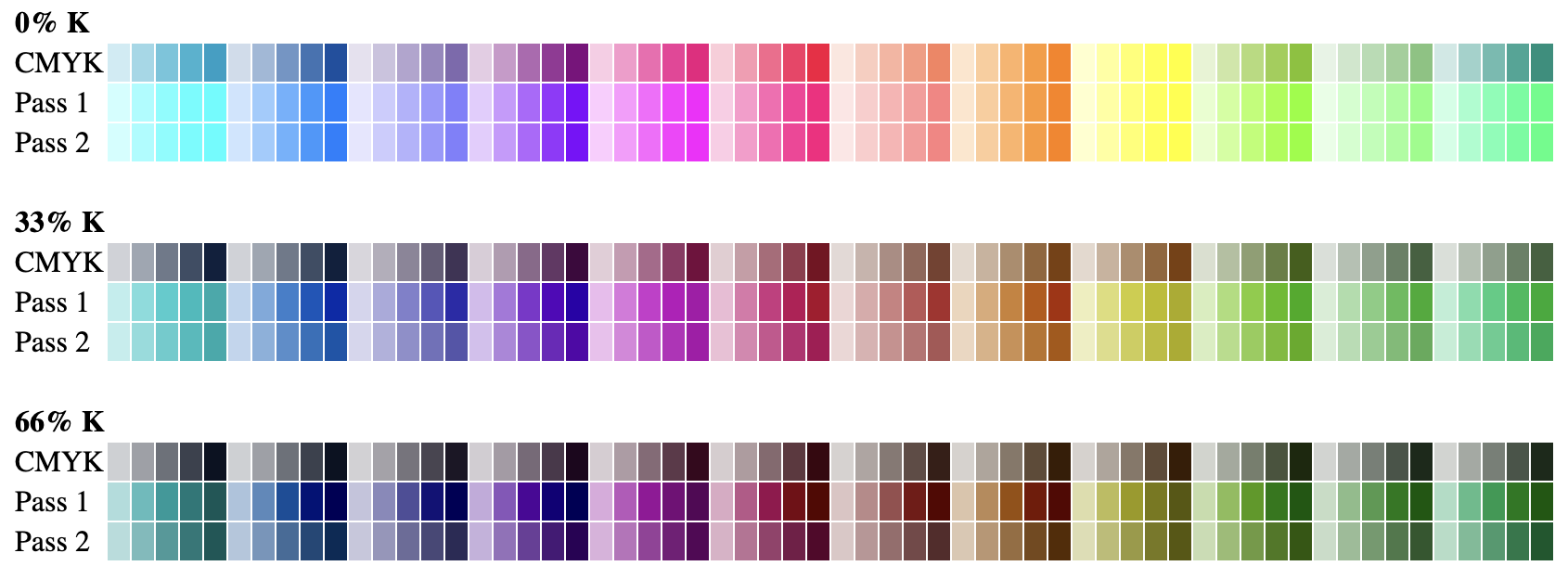
Using Adobe’s SVG export to give me a quick(ish) list of accurate RGB for 180 CMYK mixes (60 different hues each with 0K, 33K and 66K), I put together a PHP script to quickly test and compare different methods, and provide a visual table of results. It could do with some tidying up, but nevermind.
Pass 2 results
Take a quick look at the results below, or view a larger HTML table of swatches – in the table, you can also hover over the swatches to view the source CMYK and output hex colours.
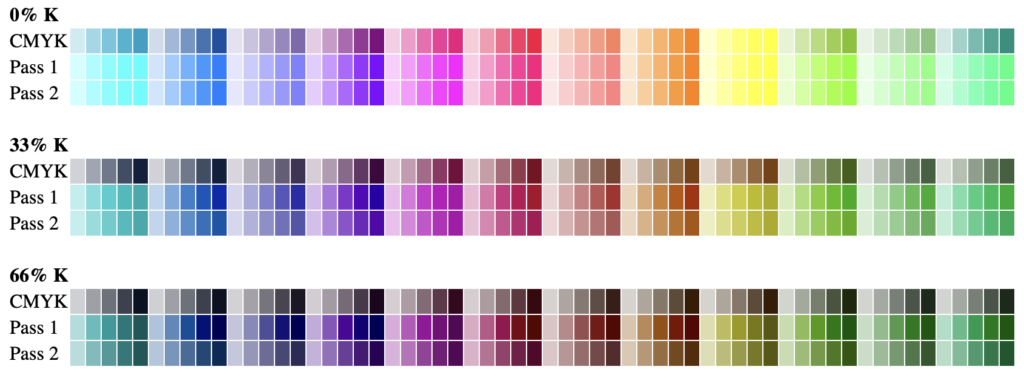
Voisen’s method is coming up with almost the same RGB colours, except for the darker browns and greens, where there is a marked improvement. The K handling is better; but the purer colours are still far too bright.
Where next?
CMYK to RGB – pass 3: Wikipedia
Back at http://www.google.co.uk/search?hl=en&q=cmyk+to+rgb+function, another result heads to Wikipedia, where there is a mathematical equation for converting CMYK to CMY and then on to RGB. Here it is:
RGB = {1 - C(1 - K) - K, 1 - M(1 - K) - K, 1 - Y(1 - K) - K}Where both RGB and CMYK are on a scale of 0-1, rather than 0-255 and 0-100. Bearing this in mind, we can translate to code without too much pain:
function cmyk_to_rgb3($c, $m, $y, $k)
{
	$c	= $c/100 ;
	$m	= $m/100 ;
	$y	= $y/100 ;
	$k	= $k/100 ;

	$r	= 1 - ($c * (1 - $k)) - $k  ;
	$g	= 1 - ($m * (1 - $k)) - $k  ;
	$b	= 1 - ($y * (1 - $k)) - $k ;

	$o->r	= round($r * 255) ;
	$o->g	= round($g * 255) ;
	$o->b	= round($b * 255) ;

	return $o ;
}
In fact, this function maps directly to Voisen.org’s, and the pass 3 results here confirm it.
So, where does this leave us?
A bit stuck I’m afraid.
A look round the internet brings up thousands of converters, calculators, functions and equations. But all the ones I’ve looked at boil down the maths above, which isn’t good enough any for serious design work. Comments welcome. I’ll write to the ImageMagick developers if I get a moment.